
If you’re a small business owner (or the one-person “marketing department” behind a small business website), blogging can feel like a weird endurance sport. You know you should publish consistently, but every post becomes a mini-project: topic choice, outline, draft, edits, SEO… and then life happens.
The real pain isn’t “writing.” It’s the workflow. Without a reliable system, you either publish sporadically or you publish quickly and regret it later (hello, awkward tone, thin content, and mystery facts you can’t defend).
That’s why this guide focuses on a step-by-step AI blog writing workflow for small business owners—a practical, repeatable system you can run every week without turning your brain into toast.
AI can help a lot here, but not as a magic wand. In 2025, search is increasingly shaped by AI experiences (like AI Overviews and richer AI-driven exploration), which makes “generic, same-as-everyone content” even easier to ignore. What wins is helpful, specific, people-first content built with real intent and real review.
Let’s build the workflow you can actually stick to—and that your future self will thank you for.
Table of Contents
What You’ll Learn in This Guide
- How to build a full AI content workflow that goes from topic → brief → outline → draft → edit → publish
- How to use an AI blog outline generator approach without producing cookie-cutter outlines
- A simple method for an AI workflow for blog planning that fits tiny sites and small teams
- How to do blog drafting with ChatGPT in clean, controllable sections (instead of one messy mega-prompt)
- A practical two-pass editing process using AI-assisted editing (structure first, line edits second)
- Mistakes that trigger thin content, “scaled” vibes, or credibility problems—and how to avoid them
- How to turn your process into reusable small business blog prompts you can run every week
Why this workflow matters more in 2025 (and not just for “SEO”)
In 2025, the internet is flooded with decent-looking words. AI made that cheap. Your advantage is not “more words.” It’s better decisions:
- Better topic selection (aligned to what customers actually ask)
- Better structure (so readers don’t bounce)
- Better credibility (so you’re not publishing questionable claims)
- Better consistency (so your site actually compounds)
Google’s guidance is blunt about the direction of travel: content should be helpful, reliable, and built for people—not made to game ranking systems. It also explicitly ties “helpful” to signals like E-E-A-T (Experience, Expertise, Authoritativeness, Trustworthiness).
So your goal is to build a workflow that reliably produces content with:
- A clear purpose,
- Real-world specificity,
- And a quality bar you can maintain.
That’s the heart of a step-by-step AI blog writing workflow for small business owners: repeatable quality.
The biggest misconception: “AI writes the post”
A better mental model: AI is a junior assistant with infinite stamina and zero judgment.
AI can:
- propose outlines,
- generate first drafts,
- summarize competitor angles,
- rewrite for clarity,
- help you build checklists.
But AI shouldn’t be the final authority on:
- Factual claims,
- Your brand voice,
- What’s actually true in your business,
- What you want the reader to do next.
Google’s guidance on generative AI content basically says the quiet part out loud: AI can help with research and structure, but publishing lots of low-value pages crosses into spam territory—especially if it looks like scaled production without added value.
So we’ll use AI for speed—and your brain for judgment.
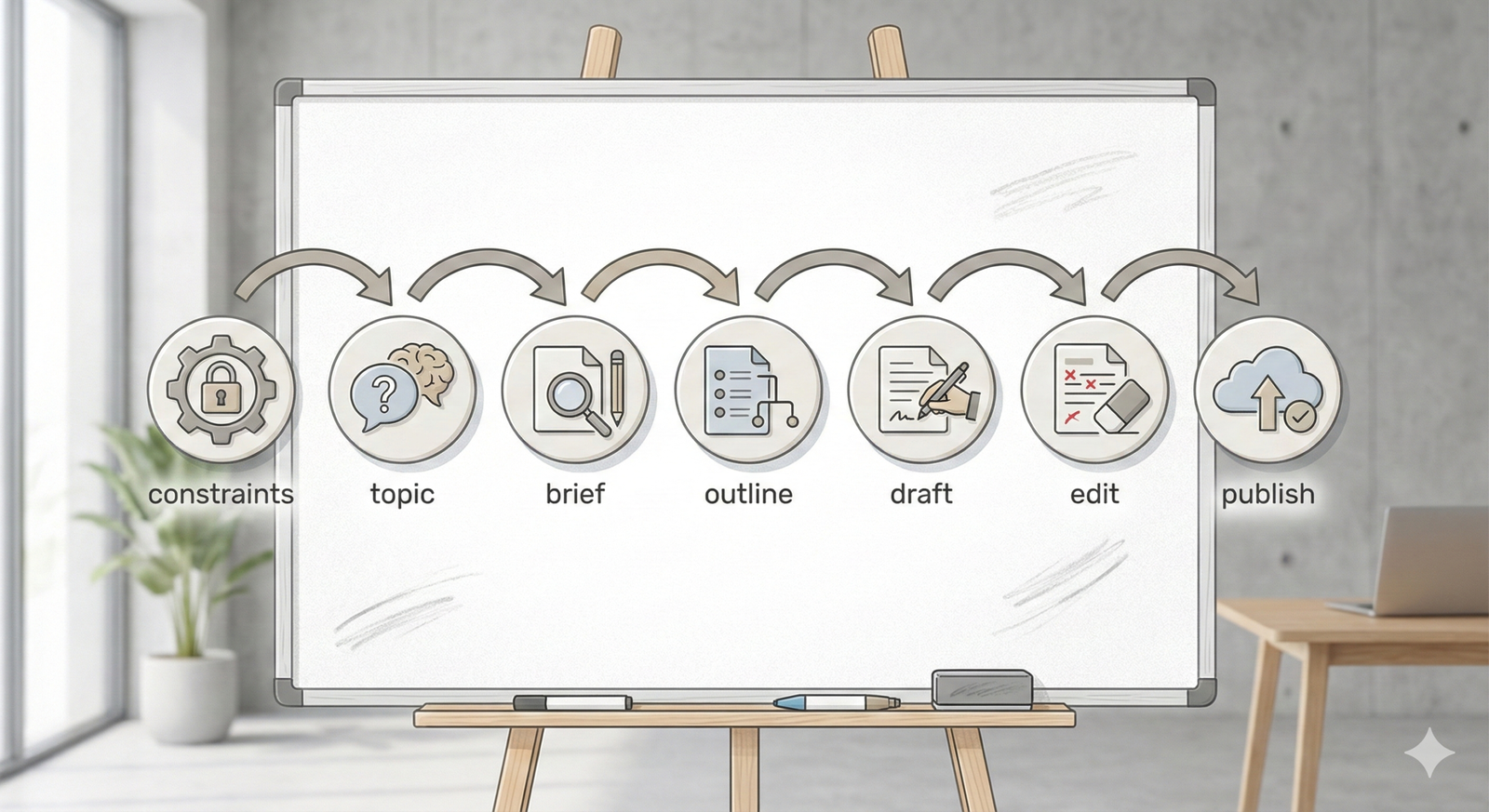
The 7-stage map of an AI blog writing system (small-site friendly)
Here’s the workflow we’ll build:
- Set constraints (audience, offer, goal, tone, “what this is not”)
- Choose a topic (intent + business value + realistic competition)
- Create a content brief (inputs that keep AI on track)
- Generate a strong outline (and fix it before drafting)
- Draft in blocks (controlled blog drafting with ChatGPT)
- Edit in two passes (ai-assisted editing: structure → line edits)
- Publish + improve (internal links, metadata, updates, repurposing)
This is the same basic logic professional content teams use—just slimmed down so it works for a small business owner.
(For a related “outline-first” approach, especially if you run a local service business, see HubPrompts’ guide on How to Use AI to Draft Blog Post Outlines for Local Services—it pairs perfectly with this workflow.)
Step 0: Set constraints (the 10-minute setup that prevents chaos)
Before you touch prompts, write down these constraints:
A) Who is this for?
Example: “US homeowners comparing HVAC maintenance options” or “busy parents looking for affordable orthodontics.”
B) What’s the business goal?
- leads (calls/forms),
- email signups,
- product discovery,
- trust building.
C) What’s the reader’s next step?
One primary action. Not ten.
D) What must be true for this post to be credible?
List 3–5 “proof points” you can actually support (examples from your work, policies, real steps, real pricing ranges if you truly publish them, photos, etc.).
E) Tone + boundaries
Examples: “friendly, clear, no hype, no fear-mongering, no fake guarantees.”
These constraints become the “guardrails” for your AI content workflow. Without them, AI will happily generate a post that sounds confident and says… whatever.
Step 1: Pick topics with intent (not just keywords)
Your article’s search intent is Informational (MOFU), which is perfect for small-business blogging: you’re educating people, evaluating options, and building trust.
A fast selection method:
The “3-bucket” topic filter
Pick topics that fall into at least one bucket:
- Customer Questions (sales calls, DMs, emails)
- Decision Support (comparisons, costs, timelines, “what to expect”)
- Process Clarity (how it works, steps, checklists, mistakes)
If a topic fits none of these, it’s often fluff.
Add a “small-site realism check”
Small sites rarely win by targeting the broadest head terms. Instead:
- Go narrower,
- Go more specific,
- Go closer to customer intent.
This is also where keyword clusters matter: a topic isn’t just one keyword; it’s a family of related questions. Modern SEO tools increasingly emphasize clusters and intent rather than single phrases.
Practical example topic (MOFU):
“Should I hire a bookkeeper or use accounting software as a small business?”
That naturally leads to service pages, consultations, or product comparisons.
Step 2: Build a content brief (your AI prompt’s “nutrition label”)
If you only steal one thing from this guide, steal this: brief first, outline second, draft third.
A content brief stops AI from wandering.
A simple brief template (copy/paste)
Use this in your doc (not necessarily in the AI prompt verbatim):
- Working title:
- Primary reader problem:
- Search intent: Informational (MOFU)
- Reader sophistication: beginner/intermediate
- Your unique angle: (what you know that generic blogs don’t)
- Must-include sections: (3–6 bullets)
- Must-avoid: (claims you can’t prove, hype, medical/legal advice, etc.)
- Internal links to include: (at least 2)
- CTA: (one action)
- Proof points: (examples, steps, mini case story, screenshots, etc.)
This brief is the backbone of your step-by-step AI blog writing workflow for small business owners.
Step 3: Create the outline (use AI like an outline generator, then edit it like a human)
Now you can use your AI blog outline generator approach.
If you run a local service business (plumbing, HVAC, dental, landscaping, etc.), your outline needs an extra layer: local intent + real-world context. For a specialized, field-tested outline workflow (Local Reality Notes, SERP-fit check, trust blocks, and “DIY vs. call a pro”), see: How to Use AI to Draft Blog Post Outlines for Local Services.
The best outline prompt pattern (conceptual)
Instead of “Write an outline about X,” try:
- Give the AI your brief,
- Ask for 2–3 outline options,
- Force it to include your “must include” sections,
- Ask it to label sections by intent (education vs. decision support),
- Ask for suggested examples.
Then you choose the best structure and tweak it.
What a strong outline should include
- A clear promise in the intro
- Logical section order (basics → steps → examples → mistakes → next steps)
- At least one mini case scenario
- A “common mistakes” section (readers love this)
- A simple FAQ
If your outline is missing examples, it will probably produce generic content.
Step 4: Draft in blocks (the clean way to do blog drafting with ChatGPT)
Here’s the trick that makes blog drafting with ChatGPT feel controllable: draft section-by-section.
Drafting in blocks lets you:
- keep tone consistent,
- review facts as you go,
- avoid runaway word salad,
- and swap sections without rewriting everything.
The “block drafting” method
Create a doc with your outline headings and draft like this:
- Paste one section heading + bullet notes into AI
- Ask for 600–900 words max for that section
- Review and adjust
- Move to the next section
You’re building a system, not summoning a novel.
Step 5: Add “human texture” (the part AI can’t fake)
This is where small business blogs can outperform giant sites.
Add any of the following:
- A quick story from the field (“Here’s what we see most often when…”)
- A real checklist you use internally
- A “before/after” example
- A screenshot (process, dashboard, email template—whatever’s relevant)
- A short “what people get wrong” section based on real customer behavior
This is your E-E-A-T advantage in practice: experience isn’t a buzzword; it’s specificity you earned.
Google’s “people-first” guidance encourages self-assessment of whether content demonstrates those helpful qualities and strong E-E-A-T.
Step 6: Edit in two passes (AI-assisted editing that actually improves quality)

Most people do one edit pass: grammar. That’s like polishing a crooked table.
Do two passes:
Pass 1: Structural edit (big rocks)
Goal: make the article work.
Check:
- Does the intro match the promise?
- Do headings flow logically?
- Are there missing steps?
- Does it answer the query fully?
- Are the examples concrete?
- Is the CTA aligned with intent?
This “structural first” approach mirrors how professional content teams operate. Ahrefs publicly describes an end-to-end process that includes outlining, structural editing, drafting, line editing, and metadata.
Pass 2: Line edit (clarity and voice)
Goal: make it easy to read.
Check:
- Shorten long sentences,
- Remove repeated phrases,
- Replace vague words (“very,” “really,” “stuff”),
- Keep paragraphs short,
- Make the tone sound like you.
This is the sweet spot for AI-assisted editing: ask AI to rewrite for clarity while preserving meaning, then you approve.
Step 7: On-page SEO cleanup (the “don’t be weird” checklist)
This is where people either:
- do nothing (and underperform), or
- do spammy stuff (and regret it).
A clean 2025 checklist:
Title + headings
- H1 matches the main topic clearly
- At least one H2 includes a close variant of the focus keyword
- Headings promise specific value (“Steps,” “Mistakes,” “Examples”)
Internal links
Add 2–5 internal links where genuinely helpful:
- one to a related guide (like the local-services outline guide)
- one to a service/product page
- one to another supporting post in the same pillar
Meta description (honest, specific)
Don’t stuff it. Make it a promise.
Avoid scaled “AI content” vibes
Google’s spam policies describe tactics that manipulate ranking systems and can lead to demotion or removal.
And Google’s generative AI guidance warns that generating many pages without adding value can violate spam policies—especially in cases of scaled content abuse.
Even the Search Quality Rater Guidelines explicitly call out scaled content abuse and provide examples, including the use of automation to produce many low-value pages.
Translation: publish less, but publish better.
Two numeric examples (to make this workflow real)
Numbers here are illustrative—think of them as “napkin math” to help planning.
Example 1: The “tiny site compounding” scenario
- Your site gets 500 organic visits/month
- Your contact form converts at 2% (10 leads/month)
- You publish 4 MOFU posts/month for 3 months (12 posts)
If those posts eventually add only 40 extra visits/month each (very plausible for long-tail queries), that’s:
- 12 × 40 = 480 additional visits/month
- At 2% conversion = ~10 extra leads/month
You didn’t “go viral.” You just built a consistent AI workflow for blog planning that compounds.
Example 2: Time budgeting with block drafting
Without a system, a post might take you 6–8 hours spread across random evenings.
With the step-by-step AI blog writing workflow for small business owners:
- 25 min topic + brief
- 35 min outline + tweaks
- 90 min drafting (in blocks)
- 45 min structural + line edits
- 25 min SEO cleanup + publish
That’s roughly 3.5 hours—and it gets faster as your small business blog prompts improve.
Common mistakes (and how to troubleshoot fast)
Mistake 1: “One giant prompt” drafting
Fix: block drafting. Always.
Mistake 2: No brief, no constraints
Fix: Write the brief first. AI behaves better with guardrails.
Mistake 3: Publishing “confident” claims you can’t support
Fix: mark any factual claims for review. If you can’t verify, remove or soften.
Mistake 4: Keyword stuffing (or weird repetition)
Fix: focus on clarity. Use keywords where they naturally fit in headings, intro, and summary—then write like a human.
Mistake 5: Scaling content before you can maintain quality
Fix: get the workflow stable at 1 post/week. Then scale carefully.
If you’re tempted to publish 50 AI posts in a weekend… that urge is understandable, but it’s also how sites drift into scaled content abuse territory.
Turning this workflow into a reusable prompt system
Once you understand the workflow, the next challenge is painfully practical: doing it again next week.
Most people struggle with:
- repeating the process consistently,
- saving the best prompts,
- adapting prompts fast for new topics,
- keeping team members (or freelancers) aligned.
That’s where Blog Writing Prompt Systems become useful—not as “prompt spam,” but as a structured library that turns your AI content workflow into a repeatable machine.
A concrete example is Smart AI Blog Outline Prompts for Small Business Sites—a reusable prompt system designed to help you generate SEO-friendly blog post outlines and workflows for small business websites using AI blog post outline prompts. It’s built for people who want consistency without reinventing the process every time.
If you’ve built the fundamentals from this guide, exploring a ready-made system like that can help you:
- reduce setup time,
- avoid missed steps,
- and standardize your blog drafting with ChatGPT and ai-assisted editing routines across posts.
(Your editor can link this section to the relevant HubPrompts store area under AI Content Publishing Systems / Blog Writing Prompt Systems.)
Summary & Next Steps
Key takeaways
- A step-by-step AI blog writing workflow for small business owners is about system design, not “writing faster.”
- Start with constraints, then a brief, then an outline—then draft.
- Draft in blocks to keep blog drafting with ChatGPT clean and controllable.
- Use AI-assisted editing in two passes: structure first, then line edits.
- Keep SEO honest and people-first; avoid scaled, low-value publishing patterns.
5 action steps you can do this week
- Write your “constraints” (audience, goal, CTA, proof points) for your next post.
- Build a one-page brief using the template above.
- Generate 2 outline options using your AI blog outline generator approach—and manually improve the best one.
- Draft the post in 3–5 blocks (not one prompt).
- Run a two-pass edit: structural fixes, then clarity/voice polish.
Prompt engineering, in this context, is not about decorating text — it’s about designing a thinking system that makes AI a reliable writing partner for real work.
FAQs
What is a step-by-step AI blog writing workflow for small business owners?
It’s a repeatable process that takes you from topic selection to publishing using AI for speed and structure—while keeping humans responsible for judgment, accuracy, and brand voice. The key is consistency: brief first, outline second, draft in blocks, then edit in two passes.
Can I do this without AI?
Yes. A solid workflow works with or without AI. AI mainly helps you move faster through outlining, drafting, and rewriting—so you can spend more time on decisions, examples, and credibility.
How much should I rely on AI vs. my own judgment?
Use AI for structure and speed, but use your judgment for truth, tone, and relevance. If you can’t verify a claim, don’t publish it. Your trust is worth more than your publishing schedule.
Will AI-written blog posts hurt my SEO in 2025?
AI isn’t the issue—low-value or scaled content is. Google’s guidance emphasizes people-first quality and warns against generating many pages without adding value. Treat AI as an assistant inside a quality-controlled system.
What’s the fastest way to avoid “generic” AI content?
Add human texture: real examples, practical checklists, local context, and the “what people get wrong” insights you only learn by doing the work. Also, start from a brief instead of prompting from scratch.
How many posts should a small business publish per month?
Start with what you can sustain at a high quality bar. For many small teams, 2–4 posts/month is realistic. Consistency beats bursts of content followed by silence.
REFERENCES
Creating helpful, reliable, people-first content – [Google for Developers]
Search quality evaluator guidelines – [RaterHub Guidelines]
Google Search’s guidance on using generative AI content on your website [Google for Developers]
Introducing AI Content Brief: Our Data, Your Creativity [MOZ]
My Complete AI Content Process for Ahrefs [Ahrefs]